Languages and Localization
Introduction
AUTO.AE is built for a multilingual audience. The interface is fully available in three languages: English, Arabic, and Russian.
This means you can browse the marketplace, apply filters, and manage your account in whichever of these languages you prefer.
Core Terminology
| Term | Meaning |
| Localization | Adapting the interface (buttons, menus) to the user's chosen language (EN, AR, RU). |
| Auto-Translation | Seller descriptions are translated automatically into your selected language. |
| RTL | Right-To-Left layout — used for Arabic so the reading flow feels natural. |
What You Will Learn Here
This article covers:
- The three interface languages available.
- How to change the language from the header.
- Which parts of the site are translated or standardized.
- How the page layout adapts for Arabic.
Available Languages
The platform currently provides:
- English (EN): The default business language in the UAE.
- Russian (RU): A fully localized interface for Russian speakers.
- Arabic (AR): A fully localized interface with native reading-direction support.
Changing the Language
You can switch languages at any time from the top header.
Steps
- Find the language selector: In the top right corner, look for the Globe icon 🌐 or the active language code (e.g., "EN", "RU").
- Click to expand: A dropdown appears listing all available languages.
- Pick your language: Click the one you want.
- Done: The page reloads instantly with the new language applied.
What Gets Translated
It is worth knowing how the platform handles text across languages.
Full translation coverage
Unlike many classified sites, AUTO.AE aims to translate everything so you get a seamless experience.
- Interface elements: Menus, buttons, filters, and system labels are professionally translated.
- Seller descriptions: The platform auto-translates the text written by the seller into whatever language you have selected.
- Ad titles: Titles are standardized and auto-generated from the car's Make, Model, Year, and Specs. Sellers cannot write freeform titles, which guarantees that vehicle names are accurate and legible in every language.
Example: If you browse in Russian:
- The "Call" button shows as "Позвонить."
- The car title "Toyota Camry" stays standardized (brands typically stay in Latin script or follow local convention).
- The seller's description "Great car, clean interior" becomes "Отличная машина, чистый салон."
Arabic Layout (RTL)
When you switch to Arabic, the page layout flips to respect the Right-to-Left reading direction.
- Mirrored interface: The entire design reverses horizontally — the logo shifts to the right and account tools shift to the left.
- Menu flow: Navigation items run from right to left.
- Purpose: This gives Arabic speakers a natural, familiar reading experience.
Visual Examples
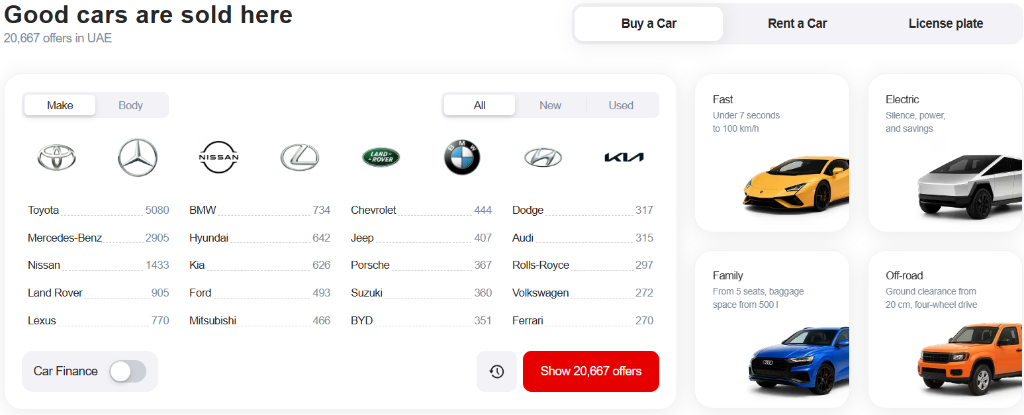
Figure 1: English interface (default view).
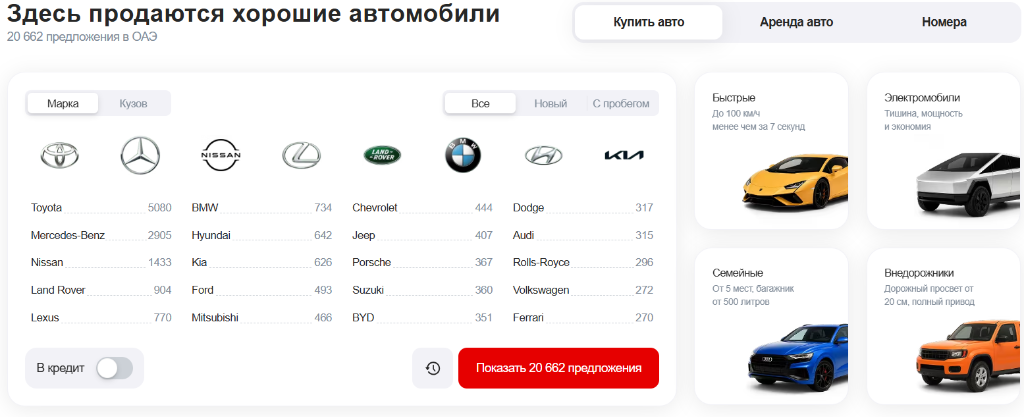
Figure 2: Russian interface — every menu, button, and label is translated.

Figure 3: Arabic interface — note the mirrored layout (logo on the right, text aligned right-to-left).
Helpful Tips
- Talking to the seller: The interface and descriptions are translated, but the seller usually communicates in the language of their location (often English or Arabic in the UAE). Be ready to use a shared language when chatting.
- Search tips: Type brand names in standard Latin characters (e.g., "Toyota") even when using the Arabic interface, because complex Arabic spellings may not always align with the standardized database entries.
Pitfalls to Avoid
- Custom titles are not allowed: Sellers cannot type titles like "Best car in Dubai!!!" Titles are strict and auto-generated to keep the catalogue consistent.
- Mixing up currency and language: You can view the site in Russian while keeping prices in AED. Language and currency are independent settings.
Useful Links
Related Pages
What to Read Next
Now that you have set up your language, learn how to adjust the currency display for prices.