

Reporting Issues
Introduction
Help us keep the community clean. If you spot a scam, a fake ad, or offensive content, report it.
Core Terminology
| Term | Meaning |
| Flagging | Marking a listing for moderator review. |
| Scam | Asking for money upfront, phishing links, or fake cars. |
What You Will Learn Here
- When to report
- How the process works
- Anonymity
Step-by-Step Guide
- Find the link: On every listing page there is a "Report" button (often under the contact options).
- Select a reason: Choosing the right reason (e.g., "Wrong Category" vs. "Fraud") speeds up the fix.
- Submit: Our moderation team reviews reports and takes action.
Visual Example
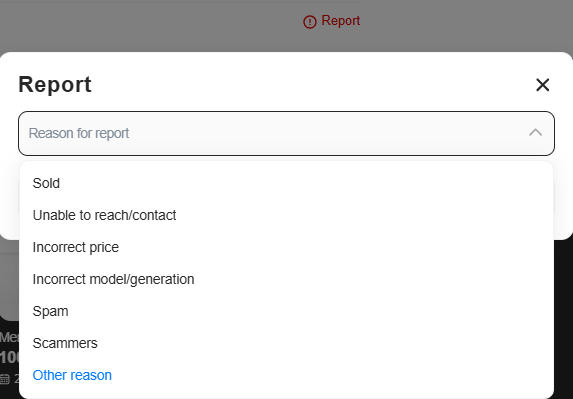
Figure 1: Choose the specific violation to help us act fast.
Helpful Tips
- Do not abuse: Reporting a competitor just to take their ad down will get you banned. Reports are audited.
Pitfalls to Avoid
- Reporting sold cars as fraud: If a car is sold but still listed, report it as "Sold / Unavailable," not "Scam."