

Reporting Fraud
Introduction
Taking action helps protect the entire community. Reporting is anonymous and effective.
Core Terminology
| Term | Meaning |
| Moderation Queue | Where reports go. Reviewed by human agents. |
| Anonymity | The user you report will not know who reported them or that they were reported (until banned). |
| Blocking | You can "Block" a user to stop all chat communication. |
Step-by-Step Guide
- Click Report: Found on the listing page or chat menu.
- Select "Fraud": Or "Scam." Be accurate.
- Details: Add a comment (e.g., "Asked for Western Union transfer").
Visual Example
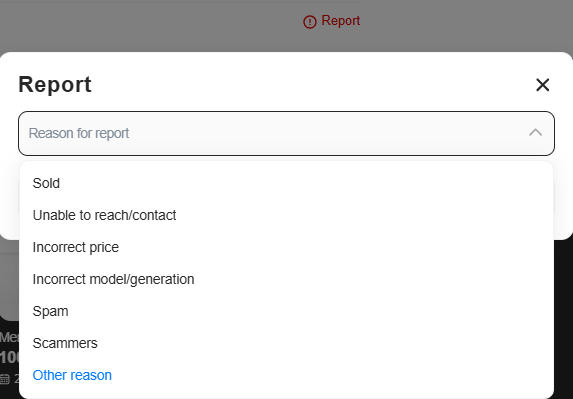
Figure 1: Select the reason that best describes the issue.
Helpful Tips
- Chat evidence: We can review chat logs for safety purposes. If the conversation happened on WhatsApp, take screenshots and email them to help@auto.ae.
Pitfalls to Avoid
- Confronting the scammer: Do not tell them "I reported you." Just report and block.